MOR-PLN-060 Version 2 last review date: Sep, 2023
Integration Subsystem
1. Overview
Currently, CBC Programmed Maintenance Management System supports only an ad hoc integration with JIWA system. Integration with JIWA hard codes all necessary mappings and connection details to provide for export of debtor and creditor invoices and purchase orders from PMMS to JIWA and import of payments from JIWA to PMMS. Due to necessity of integrating the system with multiple 3rd parties, current integrations approach needs to be refactored and generalized in order to support a more flexible and scalable model. This document outlines that generalized approach.
2. Outline
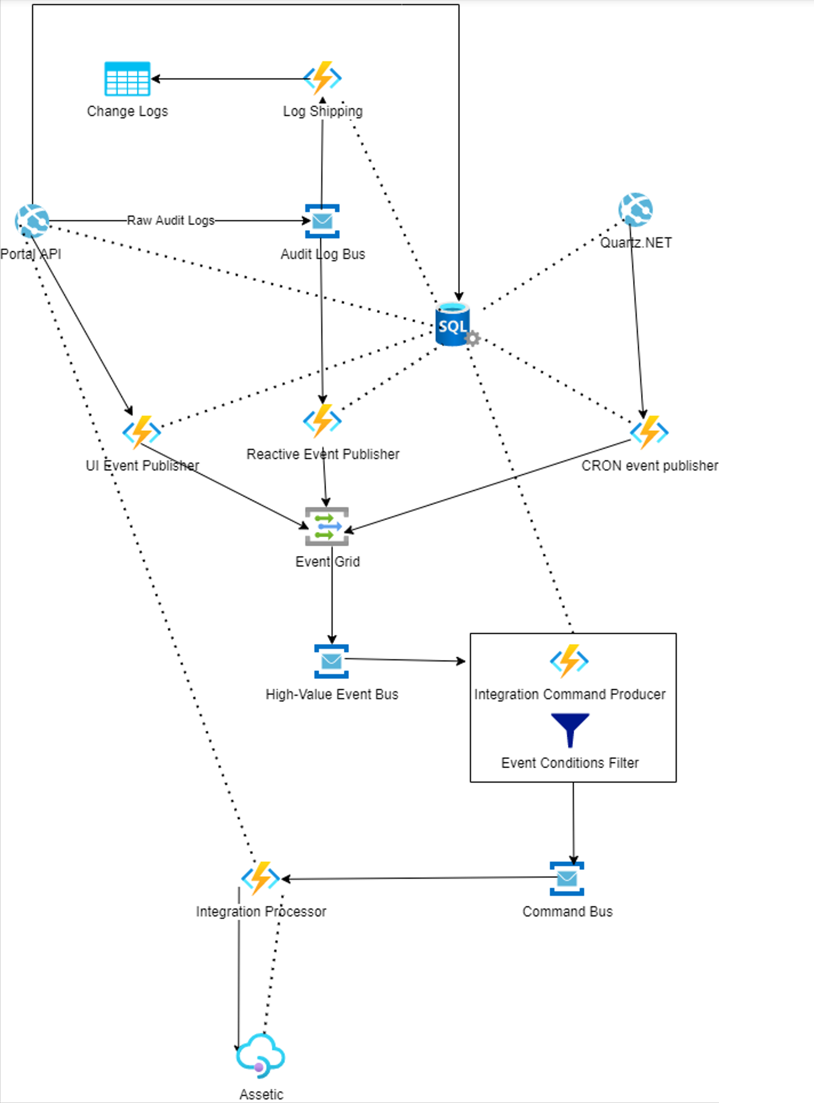
Birds-eye perspective of the model is given in the image below. Description for each part follows in subsequent sections. The image shows logical parts of the system, not necessarily their final physical presence. Some parts on the diagram may be joined into a single physical component in the final version, others may be split into multiple components.
2.1 Elements that are already present
The following elements from the diagram are already present:
- Portal and Database
- Audit Log Bus – receives raw audit log events from the portal, as processed by a 3rd party Entity Framework component and acts as a bridge between Portal and Log Shipping webjob
- Log Shipping – post-processes raw audit log events and transforms them into human-readable change log events
- Change Logs table storage – stores post-processed audit logs
2.2 Event Publishers
The diagram shows three separate event publishers, to point out the fact that processing for these 3 kinds of events is different from publisher’s perspective. In order to distinguish between the 3 types of events, following nomenclature is introduced:
- UI Events – events that are sourced from user actions (e.g. clicking a button)
- Reactive Events – events that are raised based on some occurrence in the system, not directly sourced from user actions (e.g. updating a Work Order)
- CRON events – scheduled events (e.g. executing every hour)
2.2.1 UI Event Publisher
UI Event Publisher Receives instructions from the UI, e.g. when a user clicks a button to export all Asset data to Assetic, communicates with the database to prepare an actual event that a consumer can process, packs up the event and sends it over to consumer via Event Hub.
2.2.2 Reactive Event Publisher
Reactive Event Publisher listens to the same Service Bus as the Log Shipping and determines events to be raised by post-processing the raw audit logs. Changes will need to be introduced to Audit Log Bus in order to support multiple subscribers (or an alternative approach will be used. Audit Log Bus is only a logical outline of the operations, as these 2 subscribers will logically be subscribing to same raw audit log events/
2.2.3 CRON Event Publisher
CRON event publisher receives periodic events from Quartz.NET that will need to be hosted under a service plan and prepares events as per configured scheduled event settings.
2.2.4 Integration Command Producer
Subscribes to domain events via High-Value Event Service Bus and generates integration commands as necessary.
2.2.5 Event Grid
Receives events and routes them to appropriate handlers. High-value events (such as work order change events etc) are routed to High-Value Event Bus for further processing by Integration Command Producer.
2.2.6 Command Bus
A Service Bus queue routing commands for integrations (and possibly other types of commands) produced by the Integration Command Publisher.
2.3 Quartz.NET
Quartz.NET will be initialized with CRON trigger actions, as configured via Integration Settings pages and will fire events based on that schedule, prompting the CRON Event Publisher to start producing events associated with the configured action. Still open for debate, but Quartz.NET will presumably be hosted in a new or existing app service plan.
2.4 Event Conditions Filter
Receives various types of events produced by different types of integration event publishers and applies filtering on the input, as specified in Integration Settings. Event Conditions Filter is a dynamically built C# expression applied on input of specific type (Work Orders, Assets, Documents etc). It logically belongs to Integration Command Publisher, but is shown here separately to point out its function.
2.5 Integration Processor
Integration Processor is part of the integrations system specialized for communicating with external systems and mapping the PMMS data model to external data model. Specifically for Assetic – this is the part of the system that will read objects from Assetic, overwrite necessary properties with properties changed from within PMMS and post the data back.
3. Events
Events are organized hierarchically in order to be able to subscribe to events at appropriate levels, without needing to subscribe to every event specifically.
3.1 BusinessEvent
BusinessEvent is the root of the event hierarchy generated by the system. All other types of events inherit from this type.
3.1.1 BusinessChangeEvent
Further down the hierarchy we have BusinessChangeEvent inheriting BusinessEvent (implies events that do any kind of change on a business object) that is inherited by CUDBusinessEvent that models Create/Update/Delete events of any kind on any object and is in turn inherited by a generic GenericCUDBusinessEvent, where T is a concrete domain type. By having both CUDBusinessEvent and GenericCUDBusinessEvent we are able to subscribe to ALL CUD events (by subscribing to CUDBusinessEvent) or to specific CUD events (by subscribing to GenericCUDBusinessEvent). More specific events inheriting from GenericCUDBusinessEvent are: BusinessObjectCreatedEvent, BusinessObjectUpdatedEvent, BusinessObjectDeletedEvent, BusinessObjectUndeletedEvent and BusinessObjectArchivedEvent. Concrete example for concrete domain type would be: BusinessObjectCreatedEvent, BusinessObjectDeletedEvent etc.
3.1.2 CronTriggerEvent
This event is used to initiate integration processing based on a schedule.
3.1.3 IntegrationUITriggerEvent
This event is used to initiate integration processing based on user interaction.
4. Conditions
Integration Action conditions are supported with Dynamic LINQ library, where the conditions are applied to specific objects being integrated. For example, when WorkOrder integration is in question – conditions specified will be applied to work orders at the time of integration and any work orders not matching conditions will be skipped, i.e. integrations will not run for those objects. Conditions support usage of all domain object properties present in the database model and aggregate operations such as Sum, Count etc. Properties present only in the object model are not supported as dynamic conditions, because the compiled query needs to be translatable to a SQL query. For example, for Work Order, some of the supported properties are: ID, Number, Contract.ContractNumber etc. For details on Dynamic LINQ expression language, please see: https://dynamic-linq.net/expression-language (opens in a new tab) An example of a condition for a Work Order integration action: ID > 0 AND Contract.ContractNumber != "00001" AND Assets.Any(a => a.AssetType.ID == 5)