MOR-PLN-068 Version 2 last review date: Sep, 2023
1. Overview
The software supply chain is anything and everything that touches an application or plays a role, in any way, in its development throughout the entire software development life cycle (SDLC), like code, binaries, and other components, and where they come from, like a repository or a package manager. Software supply chain security is the act of securing the components, activities, and practices involved in the creation and deployment of software. That includes third-party and proprietary code, deployment methods and infrastructure, interfaces and protocols, and developer practices and development tools. The sharp and continuous rise of code reuse and cloud-native approaches have provided malicious actors with additional angles to mount attacks several degrees of separation away from their intended targets. Exploiting just one weakness opens the door for a threat actor to traverse down the supply chain where they can steal sensitive data, plant malware, and take control of systems.
2. Risk vectors
| Risk | Mitigation |
|---|---|
| Azure DevOps | Azure Account Management, Security Checklists, Regular audit log reviews |
| VCS Repositories | Security Checklists, Integrating Security Tools into Development |
| CI/CD pipelines (Portal) | TBC |
| CI/CD pipelines (Mobile App - App Center) | TBC |
| NuGet Supply Chain (Portal) | OWASP Dependency Check & Snyk |
| NuGet Supply Chain (Mobile App) | None |
| NPM supply chain (Portal) | NPM Audit & Snyk |
| Directly referenced .NET libraries (Portal) | None |
| Directly referenced .NET libraries (Mobile App) | None |
| Directly referenced JavaScript libraries (Portal) | None |
| Code (Portal) | Training, Snyk (partial coverage) |
| Code (App) | Training, Snyk (partial coverage) |
| Azure Network | Defender for Cloud, IaC |
| CBC Network | TBC |
| Developer Workstations | TBC |
| Infrastructure access management | Azure Account Management |
2.1 Azure DevOps
2.1.1 Definition
Azure DevOps is a Software as a service (SaaS) platform from Microsoft that provides an end-to-end DevOps toolchain for developing and deploying software. Like other cloud service providers, Microsoft uses a shared responsibility model with Azure. Microsoft is responsible for keeping the underlying cloud infrastructure secure, but it’s up to the customer to harden their specific instances in the Azure cloud. Risks with using Azure DevOps include insecure authentication and access control practices and practices related to logging and auditing suspicious logging and activity.
2.1.2 Mitigation
Aside from using security checklists (e.g. https://spectralops.io/resources/the-ultimate-azure-devops-security-checklist/ (opens in a new tab) ) to harden Azure DevOps instances, a practice should be established to periodically review audit logs for any suspicious activity.
2.2 VCS Repositories
2.2.1 Definition
Version control, also known as source control, is the practice of tracking and managing changes to software code. Version control systems are software tools that help software teams manage changes to source code over time. MoreCore uses a combination of different VCS systems, including Microsoft TFS (deprecated) and Git. These tools are not built for security but for collaboration and as such they are not secure, but can be made secure through the use of tools and best practices. Risks with using VCS: hardcoded sensitive data, unsigned commits, insecure pipeline configurations, Git/TFS vulnerabilities, unpatched software and inaccurate access permissions.
2.2.2 Mitigation
Mitigation includes developer training to use secure coding practices (adopting a secret manager), integration of security tools into the development process, enforcing GPG keys to cryptographically sign the commits, patching Git/TFS with latest security features (if self-hosting), applying tool-chain security patches as soon as they are released etc.
2.3 CI/CD pipelines (Portal)
2.3.1 Definition
CI/CD stands for two complimentary DevOps software development practices: continuous integration and continuous delivery (or, less commonly, continuous deployment). In continuous integration, code changes made by different developers are compiled, tested, and merged into a single, shared code branch. The process is frequent and automated. The various steps and processes of CI and CD, along with the tools, platforms, and repositories that enable them, are known as the CI/CD pipeline. The point of CI/CD is to simplify, streamline, and automate large parts of the software development process—so updates get out to end users faster and more reliably. Risks include builder server and container misconfiguration, lack of updates to operating systems, runtimes and tools, lack of monitoring tools or regular maintenance, etc.
2.3.2 Mitigations
To mitigate issues with CI/CD pipelines, prescribed sets of actions are similar to previous sections and pertain to protecting VCS repositories, regularly auditing and updating operating systems, runtimes and build tools within the pipeline.
2.4 CI/CD pipelines (Mobile App - App Center)
2.4.1 Definition
See 2.3.1.
2.4.2 Mitigation
See 2.3.2.
2.5 NuGet Supply Chain (Portal)
2.5.1 Definition
NuGet is the package manager for .NET. The NuGet client tools provide the ability to produce and consume packages. The risk with NuGet is consuming 3rd party packages that come with vulnerabilities themselves.
2.5.2 Mitigation
Due to large number of external dependencies in any project today and it’s virtually impossible to have any kind of manual risk management for all the dependencies (and dependencies’ dependencies) – the key in mitigating this risk is using automated tools to scan for vulnerable packages and address the issues as soon as they are found. Tools currently in use include: OWASP Dependency check and Snyk.
2.6 NuGet Supply Chain (Mobile App)
2.6.1 Definition
See 2.5.1.
2.6.2 Mitigation
See 2.5.2. Currently, no tools are used to mitigate these risks in the mobile app, but the same toolchain can be used as for Portal NuGet supply chain.
2.7 NPM supply chain (Portal)
2.7.1 Definition
Similary to NuGet in the .NET world, npm (originally short for Node Package Manager) is a package manager for the JavaScript programming language maintained by npm, Inc. And similar to NuGet, the risk with npm is consuming 3rd party packages that come with vulnerabilities themselves.
2.7.2 Mitigation
Analogous to NuGet - the key in mitigating this risk is using automated tools to scan for vulnerable packages and address the issues as soon as they are found. Luckily, npm comes with the security feature built in – npm audit, which scans the installed packages and reports vulnerabilities and their resolutions. Aside from npm audit, MoreCore also uses Snyk as a fallback (in most cases it reports the same set of vulnerabilities).
2.8 Directly referenced .NET libraries (Portal)
2.8.1 Definition
This section covers 3rd party libraries that are referenced directly (i.e. from source or by incorporating a DLL into the solution) rather than via NuGet, meaning they’re not under the purview of any automatic tools that scan NuGet package configurations.
2.8.2 Mitigation
For 3rd party libraries included from source – code scan is needed to discover vulnerabilities. No directly referenced .NET libraries (DLLs) exist within MoreCore, so mitigation for this is not needed.
2.9 Directly referenced .NET libraries (Mobile App)
2.9.1 Definition
See 2.8.1.
2.9.2 Mitigation
See 2.8.2.
2.10 Directly referenced JavaScript libraries (Portal)
2.10.1 Definition
This section covers 3rd party libraries that are referenced directly (i.e. from source) rather than via npm, meaning they’re not under the purview of any automatic tools that scan npm package configurations.
2.10.2 Mitigation
Code scan is needed to discover vulnerabilities in this case, as no tool can correlate a directly referenced library version with vulnerabilities published online.
2.11 Code (Portal)
2.11.1 Definition
Represents errors or insecure coding practices that may be introduced in the Portal codebase itself by developers.
2.11.2 Mitigation
Training, Snyk
2.12 Code (App)
2.12.1 Definition
Represents errors or insecure coding practices that may be introduced in the Mobile App codebase itself by developers.
2.12.2 Mitigation
Training, Snyk
2.13 Azure Network
2.13.1 Definition
This section covers any vulnerabilities with the Azure Network, usually stemming from misconfigurations or different environments sharing resources, but also from vulnerabilities in the platform itself (e.g. ChaosDB Vulnerability).
2.13.2 Mitigation
Mitigations include using Azure solutions that automatically assess security posture (Defender for Cloud) and separating environments by using Infrastructure as Code.
2.14 CBC Network
2.14.1 Definition
Covers any vulnerabilities within the CBC network, such as physical infrastructure, email services, cloud provider outside of the Azure subscription used to host the Portal and IT solutions other than MoreCore (e.g. NetSuite, JIWA etc).
2.14.2 Mitigation
TBD
2.15 Developer Workstations
2.15.1 Definition
This vector includes any vulnerabilities stemming from improperly secured developer workstations that can be exploited to smuggle malicious code into VCS commits, steal credentials or jeopardize pipelines.
2.15.2 Mitigation
TBC
2.16 Infrastructure access management (passwords, credentials etc)
2.16.1 Definition
This section includes potential vulnerabilities stemming from the way credentials to access the infrastructure are managed by users. Do they write passwords on paper? Do they save passwords in insecure password managers? Do they access from insecure locations?
2.16.2 Mitigation
To mitigate this risk, Azure Account Management is used to limit access to only the necessary resources, lock down accounts and enforce MFA. Aside from this, continual personnel training is needed.
3 Mitigations
3.1 Training
TBC
3.2 OWASP Dependency Check
3.2.1 BACKGROUND
OWASP Dependency-Check is a Software Composition Analysis (SCA) tool that attempts to detect publicly disclosed vulnerabilities contained within a project’s dependencies. It does this by determining if there is a Common Platform Enumeration (CPE) identifier for a given dependency.
3.2.2 Setup
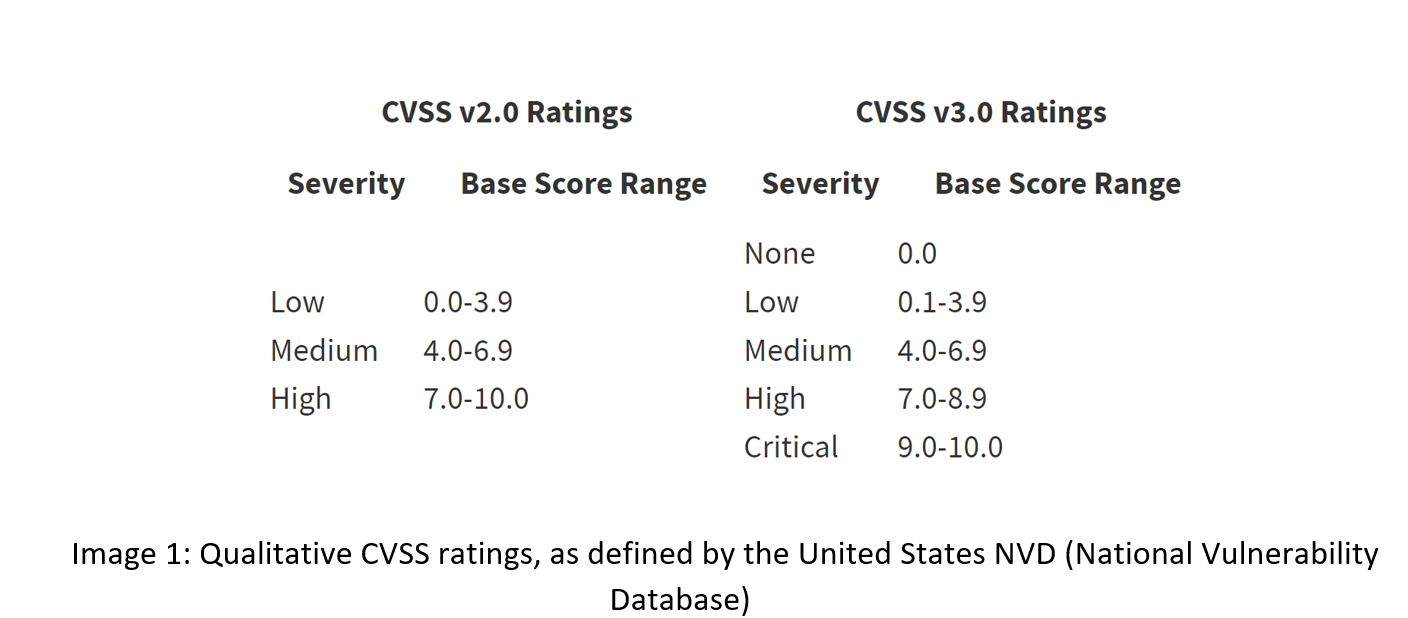
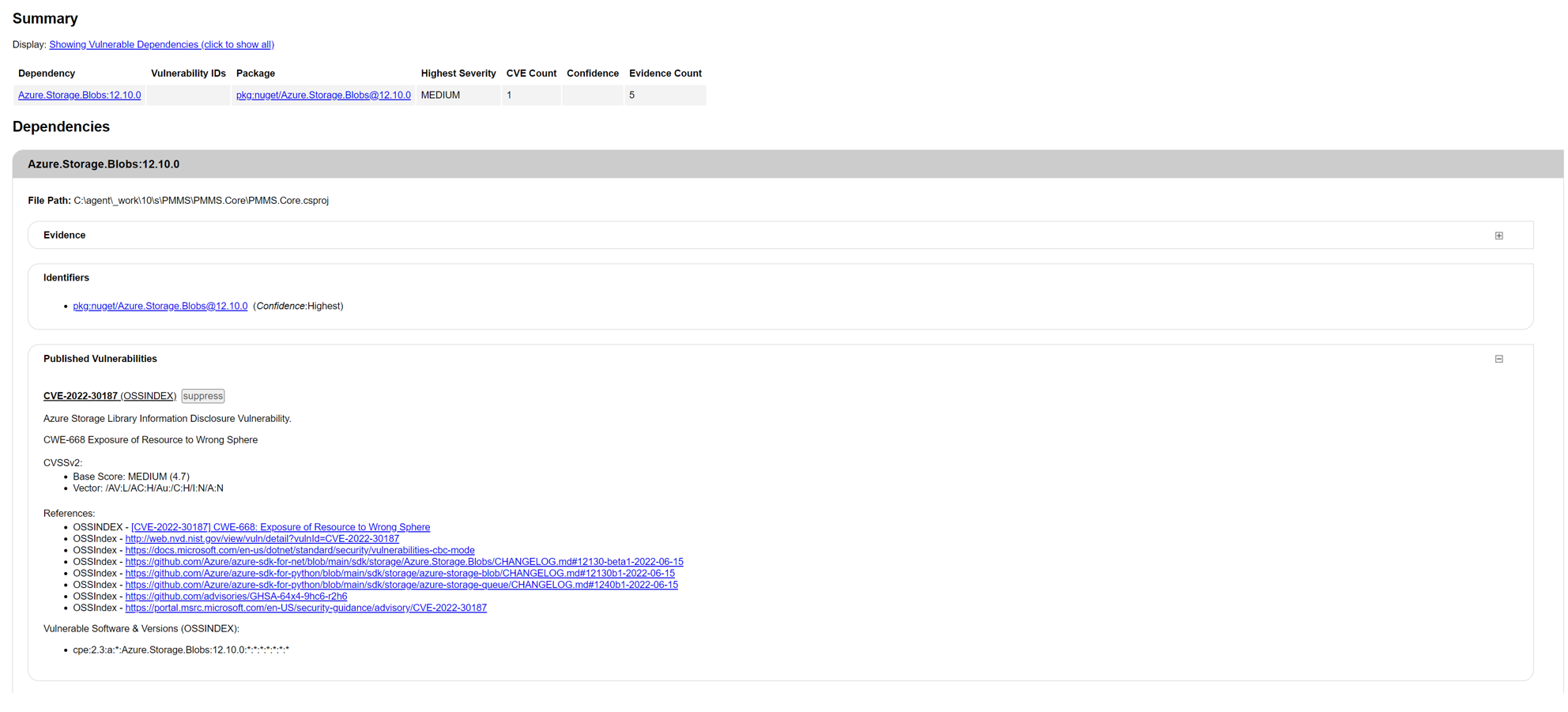
MoreCore uses OWASP Dependency Check in CI pipelines – the tool runs on every build and depending on audit results either fails the complete build or only produces a vulnerability assessment report. Vulnerability assessment reports are then published as build artifacts for further analysis. Currently, OWASP Dependency Check is configured to fail builds when vulnerabilities with CVSS level 5 or higher are identified.
3.2.3 Examples of Diagnosed Issues
3.3 NPM Audit
3.3.1 Background
NPM Audit is a built-in NPM (Node Package Manager) command that scans a project for security vulnerabilities, and if available, provides an assessment report that contains details of the identified anomalies, potential fixes, etc. NPM Audit checks the current version of the installed packages in a project against known vulnerabilities reported on the public npm registry and reports security issues if any are found.
3.3.2 Setup
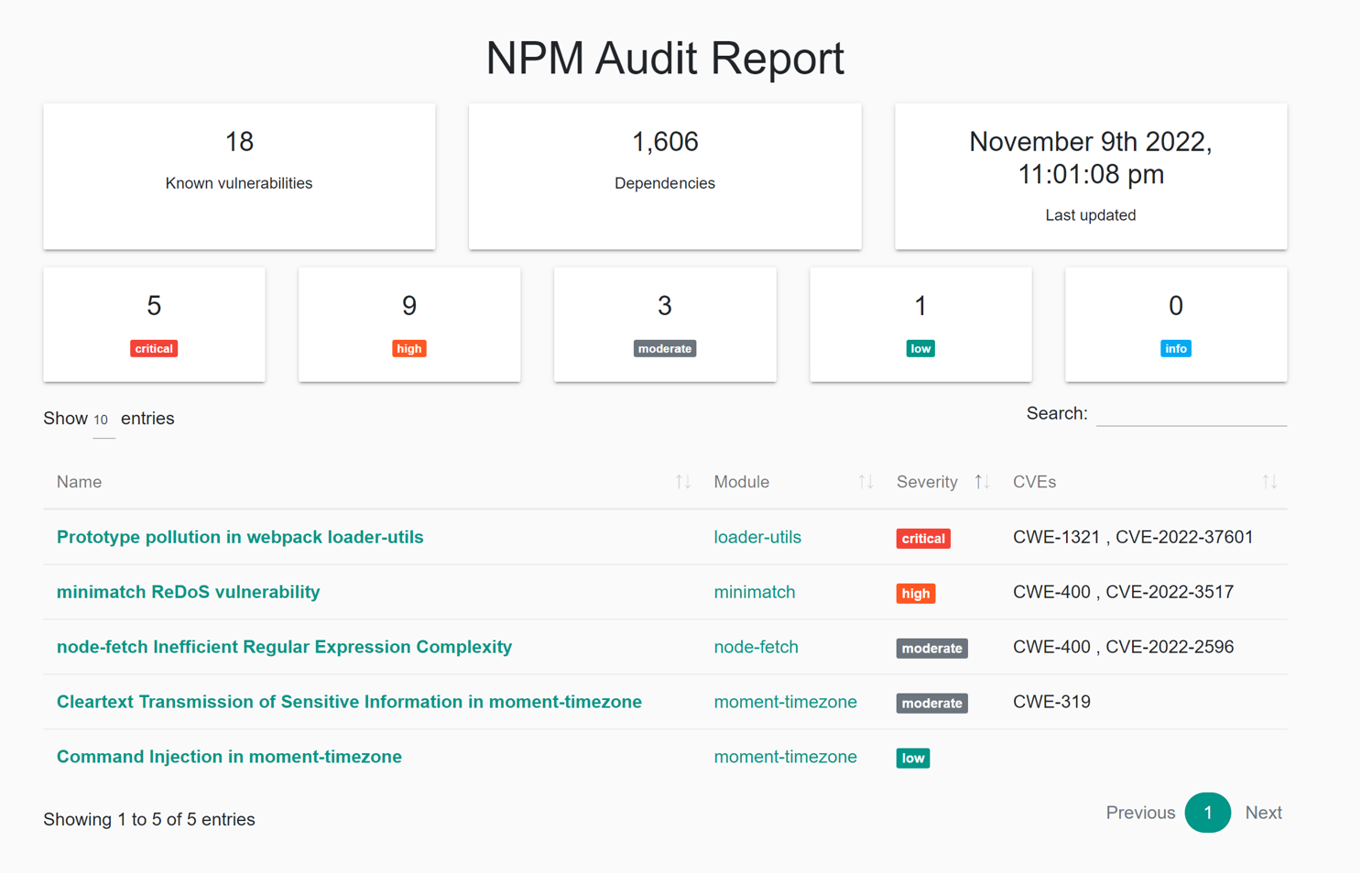
MoreCore uses NPM audit in CI pipelines – the command runs on every build and depending on audit results either fails the complete build or only produces a vulnerability assessment report. Vulnerability assessment reports are then published as build artifacts for further analysis. NPM audit specifies the following error levels: low, moderate, high and critical. Currently, NPM is configured to fail builds when vulnerabilities with level Low or higher are identified. Level Low is the lowest level NPM audit level report, so this configuration ensures that builds fail on any vulnerability found.
3.3.3 Examples of Diagnosed Issues
3.4 Snyk
3.4.1 Background
Snyk is a developer security platform that intregrates into development tools and automation pipelines; Snyk advertises as being able to find and automatically fix vulnerabilities in code, open source dependencies, containers and infrastructure as code.
3.4.2 Setup
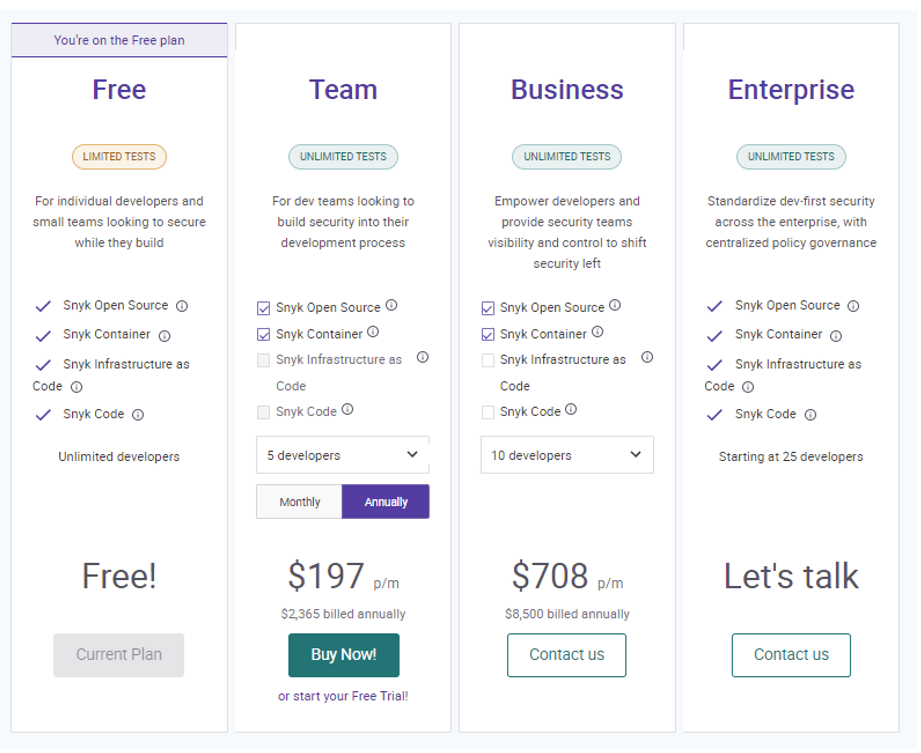
MoreCore currently uses Snyk in its free version. Though very limited, it is able to find issues with open source libraries and point to solutions (where they have been mitigated in upgraded versions of open source packages). Snyk works by directly connecting to solution’s source repository and performing scans on configuration files and code as the files are changed and code checked in. It is also able to be built into CI/CD pipeline and run tests as releases as prepared and to run tests periodically, based on configuration.
3.4.3 Access
Snyk dashboards (with appropriate credentials) for MoreCore can be accessed at: https://app.snyk.io/org/vladan.k.stojanovic (opens in a new tab) The URL can’t be changed after the fact, and re-registering for the service would be necessary to change the last part of the URL.
3.4.4 Plans
MoreCore currently uses the Free plan, which is limited to 200 private manifest tests (*.config, package.json files etc) and 100 Snyk Code tests, as well as unlimited number of open source manifest file tests.
3.4.5 Integrations
Source repository Snyk currently connects to is the Git repository at: https://selfaril.visualstudio.com/PMMS/_git/PMMSRepo (opens in a new tab) Connection is authorized via PAT (Personal Access Token). Personal access token is created in Azure DevOps then copied to Snyk settings. Aside from connecting Snyk to Azure Repos, Azure DevOps communicates with Snyk via pipelines integration. This is achieved by utilizing the Snyk Security Scan task: https://marketplace.visualstudio.com/items?itemName=Snyk.snyk-security-scan (opens in a new tab)
3.4.6 FREE PLAN LIMITATIONS
Snyk treats every separate project within the solution as a separate project, which means that there’s 57 projects for MoreCore in total as far as Snyk is concerned. This is important when analyzing plan limitations, as every project counts separately in relation to private manifest test runs. Having 200 private manifest tests to run a month means that less than 4 total private manifest tests for the entire solution can be run monthly before the limit is breached. In order to get the most out of Snyk, some tests and integrations are excluded from automatic runs. Tests are scheduled to run weekly, though limits prevent that from occurring consistently.
3.4.7 Supported Tests
3.4.7.1 Open Source Security & Licenses
Snyk test checks projects imported through Azure Repos integration for security and license issues whenever a new PR is opened. This means that Snyk monitors the Azure Repos Git repository and runs this test automatically. The tests are run only if manifest changes are detected.
3.4.7.2 Snyk Code
To analyze code for vulnerabilities Snyk temporarily clones the repository or uploads the code. Cloned or uploaded code is cached for a maximum of 24h. Limit for Free Plan is 100 tests, but, different than for private manifests – for code tests Snyk treats the entire solution as one project, so the limit is harder to breach.
Snyk was only able to find a limited set of issues a lot of which are false positives by doing the code scan, only 2 of which are identified in .NET code (1 confirmed false positive).
3.4.7.3 Infrastructure as Code
Snyk can detect configuration files and report any misconfigurations that may lead to security issues. This option is currently turned off for MoreCore, as IaC is not in place yet.
3.4.8 Usage limits
Even though, based on the limitations provided above, Snyk should still be able to at least run code tests and open source manifest tests – the scans on pull requests started failing as soon as private manifest test limit of 200 tests was breached, even though only Snyk Code and Open Source Security & Licenses options are checked. There doesn’t seem to be an option of excluding private manifest files from being scanned to enable the tests to continue without scanning private manifests. This doesn’t make Snyk useless, though, as those dependencies rarely change and even one full scan a month would allow for identifying important issues with external libraries and, to some extent, proprietary code.
3.4.9 Examples of Diagnosed Issues
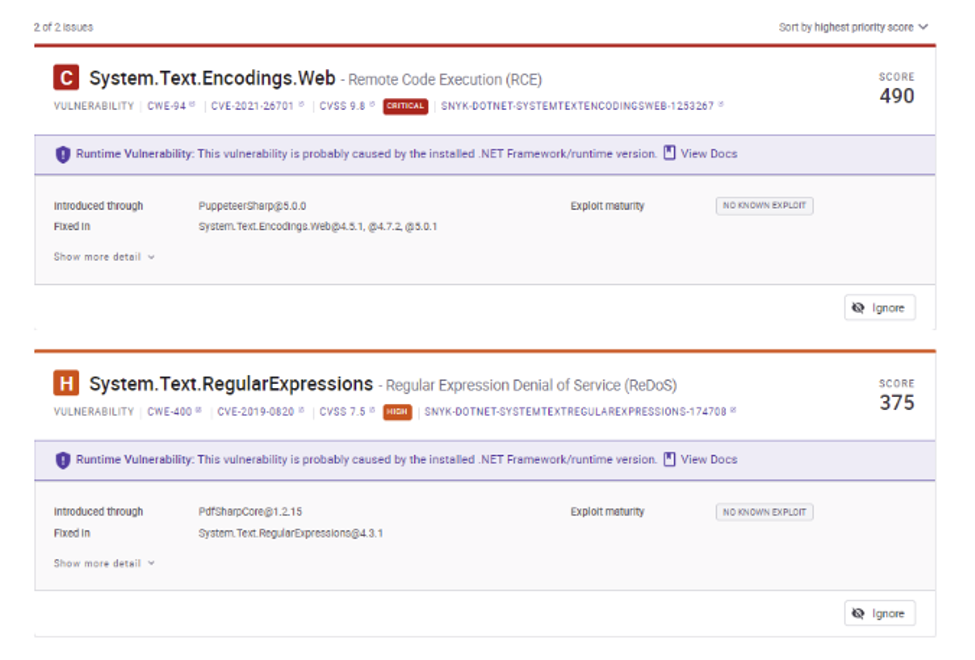
3.4.9.1 Open Soure Dependencies
3.4.9.2 Javascript
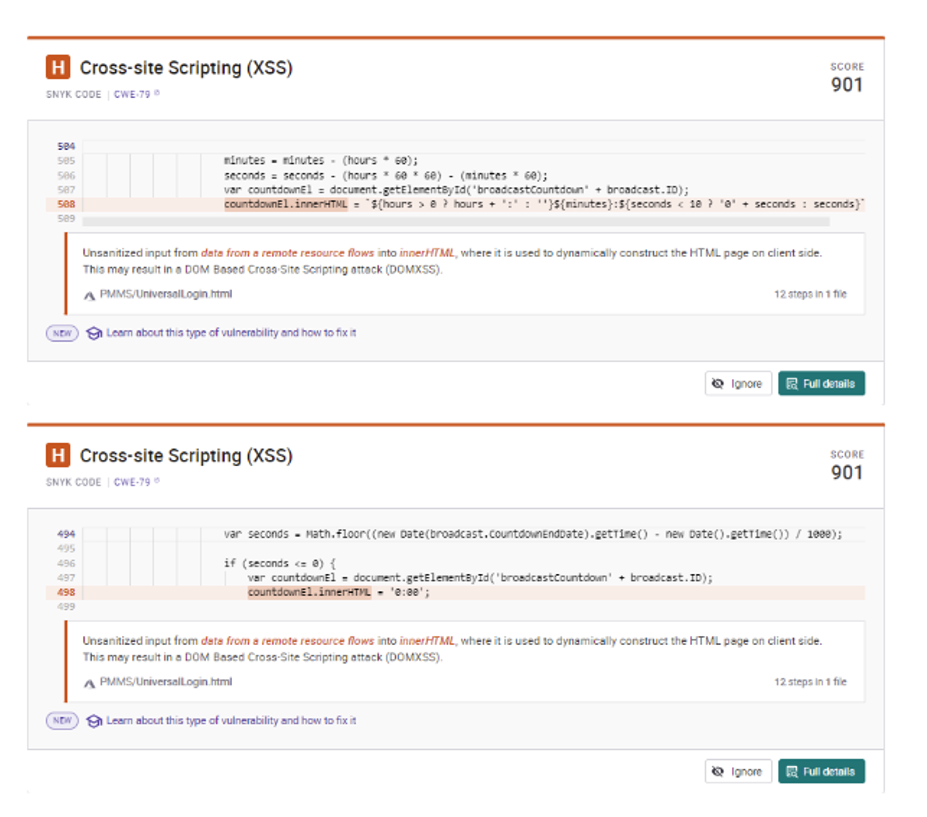
At least one (arguably both) is a false positive – tests doesn’t seem to take into consideration that innerHTML is set to a constant value in the second “vulnerability” below and reports it as potential XSS.
3.4.9.3 .NET/C#
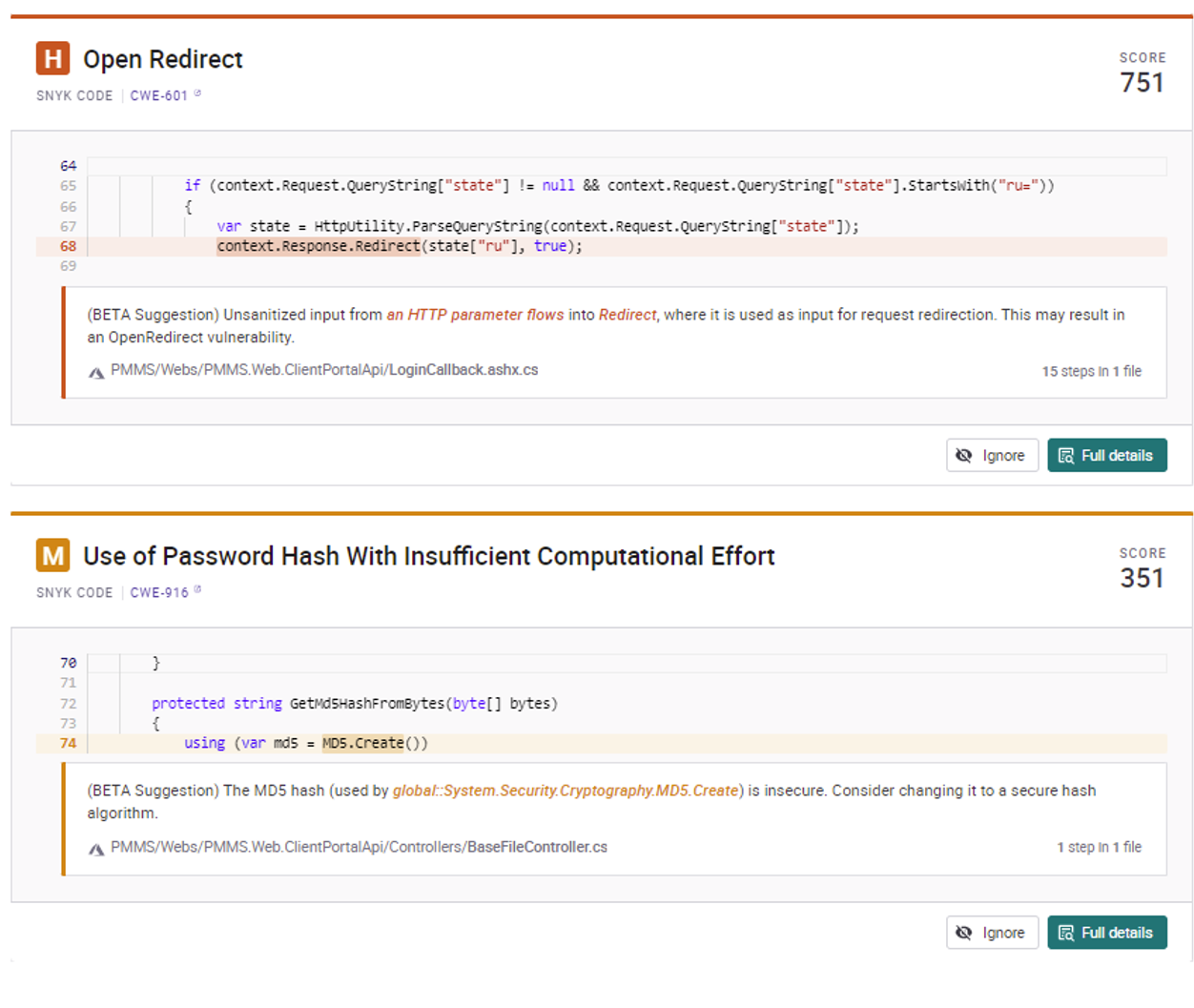
At least one (M – Use of Password Hash […]) is a false positive, as MD5 is not used for password management in the given context, but just for ensuring file transfer errors are detected.
3.5 Azure Account Management
Passwords Multi-factor auth roles
4 Reporting and Actioning
Issues identified by OWASP Dependency Check and NPM Audit are assessed on a regular basis, with the goal to fix critical level vulnerabilities immediately. As the fixes usually include changing or upgrading dependencies – deployment of vulnerability fixes is usually not immediate, as regression testing needs to be conducted before releasing changes to production environment. Aside from reactive assessments (i.e. when the builds fail due to high-level vulnerabilities), security reports are also analyzed during weekly technical meetings. With Snyk, situation is somewhat different, due to MoreCore using a free plan and limitations in number of tests that can be run monthly that plan imposes. These tests are not produced during weekly technical meetings and Snyk is monitored sporadically, when the free plan test capacity allows, to scan the project and determine if Snyk is able to identify any vulnerabilities OWASP dependency check and NPM audit aren’t able to identify. Due to commercial nature of the product, it has a propensity to over-report issues (both in number and severity), and that seems to be more true when compared to OWASP Dependency Check reports than to NPM Audit reports.